





GamesRadar+ Verdict
Based on the glowing reviews some Redditors give this controller, I was expecting the Flydigi Vader 4 Pro to blow me away. Unfortunately, I can comfortably say this is one of the most problematic controllers I’ve tested in my time as a hardware editor. Flydigi’s website, software, and customer service are inaccessible, the controller itself has design flaws, and despite doing everything I could to make the Vader 4 Pro work, it refused. The gamepad is now bricked after I tried to get its main features to work, and clever stick tension adjusters feel like a wasted perk on a controller that I simply cannot recommend to anyone.
Reasons to buy
- +
Adjustable stick tension
- +
Comfortable shape
- +
Six extra buttons
Reasons to avoid
- -
Horrendous user experience
- -
Customization software is impossible to find and doesn’t work
- -
D-Pad gets stuck in position
- -
No way to set back button assignments without additional software
- -
The Android app doesn’t work
- -
Poorly shaped back buttons
Why you can trust GamesRadar+ Our experts review games, movies and tech over countless hours, so you can choose the best for you. Find out more about our reviews policy.
If you go for a scroll on the r/Controller subreddit, it won’t be long before you come across people talking about the Flydigi Vader 4 Pro. This Chinese brand has clearly made an impression on a large subset of PC players, because the Vader 4 Pro is heralded as one of the best controllers a lot of Redditors have ever used. For that reason, I’ve been very keen to try one out.
With so many positive reviews, I thought the Vader 4 Pro was going to be a shoo-in for our best PC controllers list. There’s no smoke without fire, and I thought there really must be something to all of these positive reviews. I’ve been testing gamepads professionally for the better part of three years now, and my interest in, and use of pro controllers has gone on far longer. Flydigi has escaped me until now, because I must say, this was a brand that was tricky to get a hold of.
To save some of you some time, I’ll get to the bottom line quickly. Out of the countless controllers I’ve tested as the resident expert here at GamesRadar+, the Vader 4 Pro is the hardest one for me to recommend. Occasionally, I’ll need to accept that I’ve been sent a faulty unit, so if I run into some quirks while testing, I’ll forgive them. The Vader 4 Pro has been out for years, so it doesn’t get a pass for being an early testing sample. It has bugs upon bugs, and its user experience, which is all down to Flydigi, is the worst of any brand I’ve reviewed. There are too many red flags to ignore here, and although I’d love to see what all those Redditors love about this $50-80 controller, I can’t recommend against buying it more strongly.
Update: Friday October 23, 2026 - Well hello! This review tends to still catch a lot of eyes, perhaps because its low score makes it a conversation piece. If you're still here in 2026 and beyond, allow me to provide some small bits of context for my takes on FlyDigi throghout this review. Keep an eye out for these update boxes if you want my latest thoughts. For starters, I'll say that I still stand by this review. 1 star might seem harsh, but I promise you that in a now four-year stretch of reviewing controllers, this is the worst experience I've had with one. The controller bricked itself permanently, and that's not the first report online of this product doing that. I definitely, definitely do not recommend you buy this controller. If not for any other reason, because newer models of the same product exist and I'll tell you more about them further down the page.
Design

The Flydigi Vader 4 Pro doesn’t seem like anything too unique at first glance. It looks like an Xbox controller thanks to that typical offset thumbstick layout, and has some nice V-shaped design flourishes that set it apart from Flydigi’s other pro pads. There’s a nice strip of RGB lighting that’s (supposed to be) customizable in the brand’s PC software.
There are two noticeable design points on the face of the controller I want to highlight. Firstly, there are some grey rings around the thumbsticks. When you twist those around, they change the stick tension of each module. That means that if you prefer to flick and whip your thumbsticks around at light speed with no resistance, you can spin these rings all the way to the left. If you want a tighter experience, turn them to the right and have sticks that will take more pressure to move in any direction, and will flick back to their central position immediately.

Update: Friday October 23, 2026 - One thing I will say is that, for all my disdain for the Vader 4 Pro, it has become a trendsetter that's seen a legacy develop through the rest of the controller market. The Vader 4 was the first pad I saw to include tunable thumbstick tension through those spinny stick gates, and it's now starting to pop up elsewhere. The 8BitDo Ultimate 3 has the same feature, the Vader 5S made people aware of it on Xbox, and the newly announced Nacon Revolution Pro X is also making it a main feature. The Vader 4 has clearly had a big influence on the market, and for good reason, because it has some great ideas. Unfortunately, as you'll read on, those ideas weren't executed well at the time.

That’s a superb bit of controller design, and one I wish was present on any other pro controller these days. It’s either a feature that other controllers ignore completely or one they turn into a pesky DIY job because you need specific tools for the job.
The other clever design point I want to spotlight is the two extra face buttons. If a controller wants to offer six face buttons, it usually pulls back on every other feature to pursue fighting game enjoyers. I’m glad this is a gamepad that can offer two extra face buttons as well as the four back buttons it has. That’s unique, and I hope more brands take note. It is a bit of a shame that these buttons are cheap-feeling plastic ones that don’t align at all with the regular AXBY buttons, which are clicky microswitches.
Features

Update: Friday October 23, 2026 - Good news folks, if you were attracted to the feature set of the Vader 4 Pro, a sequel that's officially licensed for Xbox has arrived. That said, you'll need to be okay with only playing in wired mode, but if that's not a problem for you, you should check out the Vader 5S, which can be seen in the image below. It had a much, much better experience with the sequel to this controller, and having been in closer communication with FlyDigi, I like the ideals and ambition to make changes the brand is working on.

The four back buttons that feature on the Vader 4 Pro are a little disappointing, if I’m honest. They’re placed horizontally, which isn’t always a bad thing. But these ones remind me of the Asus ROG Raikiri Pro because their design and shape are at odds with being able to use them comfortably. The outer buttons are fine and are angled appropriately with the grips to make pressing them easy. For some reason, the inner ones are angled away from your middle fingers, meaning it takes a larger readjustment for your hands to use them with one finger. The back buttons as a whole are placed far too high up for your ring fingers to be in play, so I’m not sure what the thinking was here. It doesn’t help that the smooth plastic surface is extremely slippery, and the buttons are angled, meaning you constantly slip off them.
The Vader 4 Pro features trigger stop switches, which turn them into clicky mouse-switch-style actuators. The D-pad is a circular one that also clicks in, albeit with a much cheaper plastic feel to it.
The Vader 4 Pro is compatible with Flydigi’s lineup of charging stands and has two wireless charging capacitors on its bottom. That helps to give this controller enough juice to power its wireless battery, which, I’d love to tell you lasts a certain amount of time, but as I’ll come onto, testing wasn’t successful enough for me to find out. There’s wireless connectivity for PC players, as well as wider compatibility for Nintendo Switch and Bluetooth devices.
Performance

Update: Friday October 23, 2026 - Before we continue, I do just want to issue an update on this section. For starters, I will again reiterate that I stand by every word of the performance section of this review. I outline the disaster I had with the Vader 4 Pro in trying to test it and access its software, so you can read up on it below if you like. Unfortunately, for the majority of this brand's products and for a lot of people, the experience below is still going to be the case. FlyDigi is doing its best to turn a new leaf and make things more secure and accessible in various territories, but accessing its software still feels like blasting through a dozen red lights, and specifically in this age of internet safety, nobody should be doing that. Thankfully, in FlyDigi's newer models, there are fixes in place. The FlyDigi Apex 5, which has become one of my favorite controllers ever, has an on-board menu system through its display which prevents any need for you downloading dodgy controller software. The officially licensed Xbox controller, the FlyDigi Vader 5S, has a separate, much more regulated version of Space Station which means you have loads of safe ways to customize it. I'd recommend either of those gamepads, but not any other product from this brand which forces you to go seeking out one of its applications not downloadable through official Microsoft store channels.
I think the best way to explain why I'm not a fan of this controller is to outline my testing process from start to finish in as much detail as possible. I’ve laid this out as honestly and as clearly as possible because I feel it’s the best way to make it clear to Flydigi and any potential buyers that this was an unsalvageable product.
When I unbox a new controller I’m about to test, I always start in the same way. Nearly all of them have back buttons these days, so job one is getting those mapped. Some gamepads need you to download a PC application to assign extra buttons, while others only need you to open up the instruction pamphlet and use some handy button combinations. The best controllers have an option for both. The worst ones force you to download the extra software.
When I unboxed the Vader 4 Pro, the instructions made no mention of the six extra buttons this controller put in my hands. A small table mentioned “key mapping” and pointed me toward some companion software called "Flydigi Space Station". I wasn't so sure about this, because on other controllers, "key mapping" could mean mapping the normal buttons on the controller to mouse and keyboard functions to help with general use on PC. Since it was the closest thing to button assignments I could see in the information in front of me, to Google I went.

I searched for the official Flydigi website since this is where I thought I’d find the official software easily. The Google search brought it up, and I clicked. Nothing. Just a blank screen and a notice saying “This site can’t provide a secure connection en.flydigi.com uses an unsupported protocol. ERR_SSL_VERSION_OR_CIPHER_MISMATCH”. This notice essentially means that there's a problem with the security protocol of the website you're trying to visit, which should raise some suspicion.
I instead googled “Flydigi Space Station Software”, and no official website result came back for it. A few results pointed toward software called Flydigi Game Center, but I couldn't access any download links for that either because the brand's website kept throwing up the same security issue.
My experience with this controller has been a disaster. In all my testing, reviewing, and coverage of the controller market, I’ve never run into as many issues with one gamepad as I have with this one.
Hm, that’s bizarre, I thought, maybe if I scan the QR code on the instruction leaflet, I’ll have more joy getting to an in-depth user manual. I scanned it, my phone immediately warned me that I might be getting scammed, and that I should seriously think about whether I want to continue to the URL. Both of these security warnings back to back were not encouraging, so I exited out. I tried in multiple territories using a VPN, I tried different browsers, different devices, and even tried removing the “en” from the beginning of the URL, and every time I was met with the same issue. This website was clearly problematic, and I couldn’t find a way to access it.
It was then that the red flags really started to appear. From a search on Reddit, despite all the people recommending the controller, there were threads of people talking about issues where they couldn’t use the software, or that they finally downloaded it, and it immediately triggered their systems to take multiple screenshots. Granted, this could be a Windows 11 update quirk someone has run into, but when all other signs point to this software being problematic, it doesn’t fill me with confidence. Others who had bought the Vader 4 Pro were totally unable to use the software they needed to get their money’s worth out of this controller.
I found a YouTuber, MikeTheTech, who had uploaded the Space Station software to his own website around 3 years ago because it was so inaccessible, even back then. From all my research, that seemed to be the only way to actually download what was said to be Flydigi’s application. When that’s your only option as someone who has spent money on a peripheral, that’s totally messed up. I’ve never seen that from any of the other controller brands I’ve reviewed. Furthermore, if the entire Flydigi website isn’t accessible, that doesn’t just mean you can’t assign button mappings; it means you can’t reach out to Flydigi for customer support, or to organize a replacement product or refund.

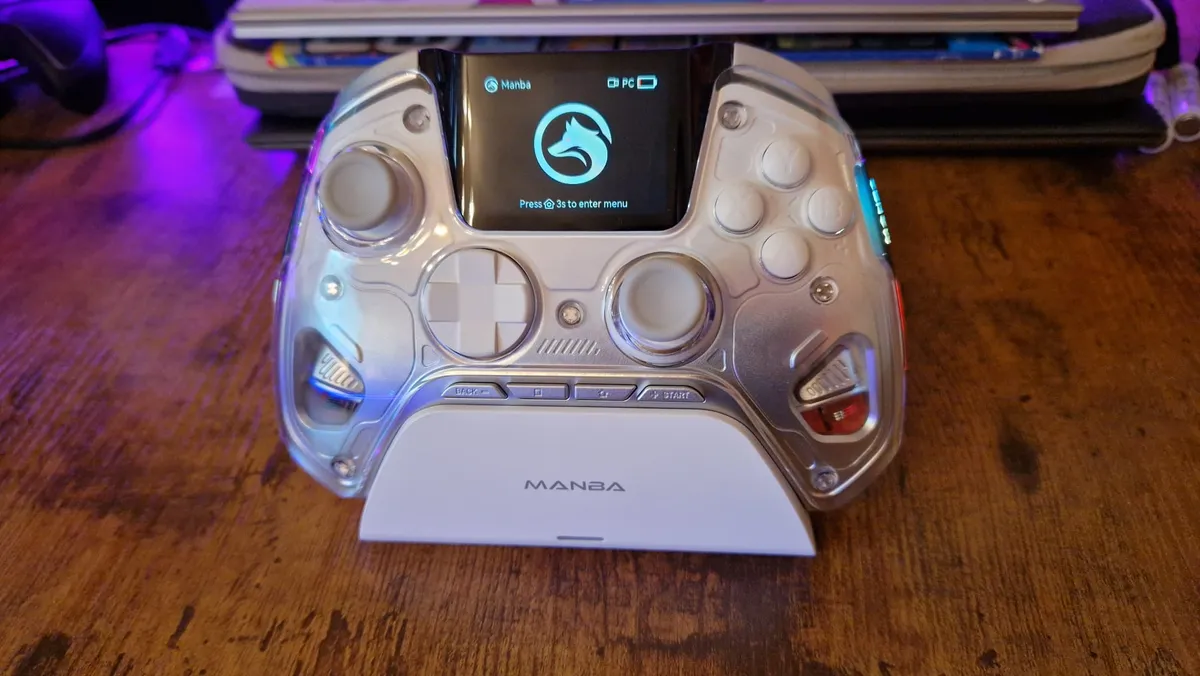
The Manba One: $69.99 at Amazon
GameSir Cyclone 2: $49.99 at Amazon
I decided to at least give the controller a whirl without using the extra buttons for now, and see if I could get past the software hurdle another day. I plugged into my PC, loaded up Celeste, and the controller worked fine. It was fairly comfortable, it had decent feedback, and I loved being able to play around with the stick tension. Sadly, when navigating menus, I felt the D-pad reacting very slowly to my presses. After a quick look, that’s because the pad was actually getting stuck in the down direction. Not encouraging from a design standpoint in the slightest.
After a while, it felt totally pointless reviewing a controller with six extra buttons while not being able to use them.
I decided to try out the Android Flydigi app to see if linking it up there would work. It didn’t. There was a way to connect the Vader 4 Pro to my phone via Bluetooth, but the only button that looked like it would let me configure any settings was sitting underneath my phone's navigation bar, and the app didn’t scroll to let me press it.
Reluctantly, I knew what my last remaining option was. I headed to MikeTheTech’s video once again. The comments seemed to attest to the download he was talking about not being malware, so I decided to give it a try since I had no other option.

I downloaded the software, I loaded it up, and immediately, the controller and my PC started behaving very strangely. Spotify toggled play and pause, Steam big picture mode opened, and a keyboard for the controller to use within Windows 11 appeared on my screen. It wasn’t malware, and a quick security scan showed that much, but it was not what you want from a simple bit of controller software.
Once I got the application to calm down, I did manage to set a few back button assignments. That said, whenever I assigned one, the window would minimize. I had read from a few users on Reddit that the software had to remain open for those changes to save, though, so I kept it open. I loaded up Celeste again, and no matter what I did, the game now didn’t recognize the Vader 4 Pro as a controller. I tried everything in the software that I could, I played around with Steam controller settings, and I went back to the internet to look for people who had similar problems. There was nothing. Connected to my PC via the wireless dongle or a cable, the Vader 4 Pro now wasn’t working in any game. After closing the software and unplugging, it wasn’t even being recognized by the Space Station software anymore. It was bricked.
Should you buy the Flydigi Vader 4 Pro?
I think it's safe to say that my experience with this controller has been a disaster. In all my testing, reviewing, and coverage of the controller market, I’ve never run into as many issues with one gamepad as I have with this one. There must be something great about it that a lot of Redditors enjoy, and power to them. All I can share with you is my honest experience, and when I compare it to the multitude of controllers I’ve reviewed throughout my career so far, this is probably the most problematic.
I strongly advise that you steer clear of buying this controller, because there are so many others that are worth your money. There are pads out there priced similarly, offer great features and work without all of these points of friction.
How I tested the Flydigi Vader 4 Pro
I attempted to test the Flydigi Vader 4 Pro in the same ways I test any and all other controllers. For a full rundown of everything I attempted to make this controller work, check out the performance section.
For more on how we test, check out the full GamesRadar+ Hardware Policy.
For more on the wonderful world of controllers, check out the best Xbox Series X controllers, the best PS5 controllers, and the best Nintendo Switch controllers.

